User Manual for BlueFish444 Epoch | 4K Neutron Turbo LP Click to enlarge the picture
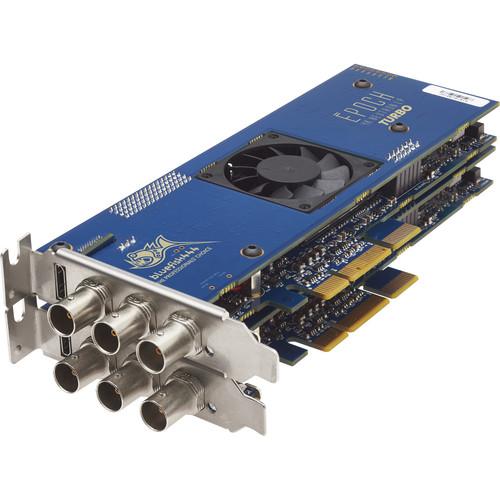 Contents of the user manual for the BlueFish444 Epoch | 4K Neutron Turbo
- Product category: Computer Hardware BlueFish444
- Brand: BlueFish444
- Description and content of package
- Technical information and basic settings
- Frequently asked questions – FAQ
- Troubleshooting (does not switch on, does not respond, error message, what do I do if...)
- Authorized service for BlueFish444 Computer Hardware
|
User manual for the BlueFish444 Epoch | 4K Neutron Turbo contain basic instructions
that need to be followed during installation and operation.
Before starting your appliance, the user manual should be read through carefully.
Follow all the safety instructions and warnings, and be guided by the given recommendations.
User manual is an integral part of any BlueFish444 product,
and if it is sold or transferred, they should be handed over jointly with the product.
Following the instructions for use is an essential prerequisite for protecting
health and property during use, as well as recognition of liability on the part of the manufacturer
for possible defects should you make a warranty claim. Download an official BlueFish444 user manual in which you will find instructions on how to install, use, maintain and service your product.
And do not forget – unsuitable use of a BlueFish444 product will considerably shorten its lifespan!
|
Product description - The Bluefish444 Advantage
The Epoch | 4K Neutron Turbo LP from Bluefish444 features two bi-directional I/O PCIe cards that work together to support capture and playback applications that require 4K/UHD SDI signals up to 60 fps, multi-channel SDI signals, and 4K/UHD HDMI monitoring. At half the length of a full-size PCIe cards, the Epoch | 4K Neutron Turbo cards take the functionality of larger cards and packs it into a form factor that allows for easy integration with rack mounts, smaller-form computers, and portable PCIe or Thunderbolt enclosures. Both cards have low-profile shields for increased compatibility with compact expansion chassis. A separate model is available that features full height shields and connectivity for AES/EBU digital audio, analog audio, and RS-422 control via a breakout cable.
With three SD/HD/3G-SDI connectors per card, the Epoch | 4K Neutron Turbo accepts single-link, dual-link, and quad-link SDI formats. This allows it to support DCI 4K (4096 x 2160) and Ultra HD (3840 x 2160) 12-bit RGB DCI signals up to 25 fps, 8-/10-bit RGB up to 30 fps, 8-/10-bit YUV up to 60 fps, and even two channels of 8-/10-bit YUV up to 30 fps. For cost-effective monitoring, the main card also features an HDMI output that supports up to DCI 4K at 24 fps and UHD up to 30 fps.
Like other Bluefish444 cards, Neutron cards use a 12-bit processing pipeline to maintain the full quality of your source material. Additional features such as 4 x 1D x 12-bit LUTs on all of the SDI outputs, a low-latency hardware video keyer, and compatibility with industry standard Bluefish444 and 3rd party software make the Epoch | 4K Neutron ideal for a variety of applications and workflows, including editing, color correction, video streaming, production, mobile production, digital intermediate, and image quality control. - Bi-Directional SDI Inputs/Outputs
-
- Can playout 4K/UHD over 3G-SDI or HDMI, or capture 4K/UHD over 3G-SDI
- 6 x BNC connectors that each support SD/HD/3G-SDI input and output signals
- Dual-link and quad-link HD/3G-SDI support
- One multi-format BNC connector supports genlock input in addition to video signals
- 4K SDI High Bandwidth I/O
-
- 8/10-bit YUV 4K/UHD @ 23.98, 24, 25, 29.97, 30, 48, 50, 59.94, and 60 fps
- 8/10-bit YUV 2-channels 4K/UHD @ 23.98, 24, 25, 29.97, and 30 fps
- 8/10-bit RGB 4K/UHD @ 23.98, 24, 25, 29.97, and 30 fps
- 12-bit RGB 4K/UHD @ 23.98, 24, and 25 fps
- 4K / UHD HDMI Monitoring
-
- HDMI 1.4 output for cost-effective monitoring
- Supports deep color and 4K/UHD resolutions
- 3D frame packing
- Thunderbolt Expansion Chassis Compatibility
-
- Works with portable PCIe and Thunderbolt expansion chassis, from small single-slot devices to larger multi-slot options
- Compatible with select Sonnet, Magma, and Netstor chassis
- Visit Bluefish444's website for a full list of qualified 3rd party chassis options
- 12-Bit Processing Pipeline
-
- Allows 8-, 10-, and 12-bit SDI video signals to be produced from 8-, 10-, 12-, and 16-bit pixel formats for the highest quality from your source material
- 4096 discrete values of red, green, and blue are maintained per pixel
- 64 times the color precision of a traditional 10-bit processing pipeline
- 4 x 4 x 32-Bit Color Matrix
-
- Color space conversion image processing includes a fully programmable 4 x 4 x 32-bit color matrix
- Reduces colorspace conversion errors and ensures color accuracy during capture, monitoring, and mastering
- Primary Hardware Color Corrector
-
- 4 x 1D x 12-bit LUTs on all SDI outputs gives control over lift, gamma, and gain prior to monitoring or mastering your content
- When the programmable 4 x 4 x 32-bit color matrix is combined with the onboard 1D LUTs, it provides a powerful hardware color corrector
- Low-Latency Video Hardware Keyer
-
- Allows video layers to be combined in hardware with only microseconds of delay
- Enables animated logos, captions, ticker tapes, etc. to be keyed over live video feeds at full 12-bit precision and with minimum input to output delay
- Hardware keyer can also function as an image pre-multiplier to assist in previewing images with alpha data
- Bluefish444 Symmetry Included
-
- Integrated DI acquisition, review, and play out software
- Windows compatible
- Work in 10-bit RGB or 10-bit YUV color space
- flexible and intuitive interface
- 3rd Party Software Compatibility
-
- Adobe Premiere Pro CC
- Adobe After Effects CC
- Adobe SpeedGrade CC
- Adobe Audition CC
- AVID Media Composer
- AVID Pro Tools
- Assimilate SCRATCH
- Bluefish444 Fluid ingeSTore
- Bluefish Symmetry
- DrasticPreview Pro
- Drastic Media NXS
- Telestream Wirecast
- vMix
- Additional Hardware Features
-
- 4-lane PCI-Express (8- and 16-lane compatible)
- High-performance bypass relays
- Automatic cross-locking and intelligent output phasing across formats
- Audio sample rate converters
- Master Routing Resource (MR2)
- Input Stream Integrity Management 9ISIM)
- Full duplex DMA data transfer bandwidth 1.1 GB/s
- 256MB onboard memory
- Interlocking Genlock between Neutron cards
In the Box BlueFish444 Epoch | 4K Neutron Turbo LP 2 x Epoch | 4K Neutron LP Bluefish Symmetry Software (Windows) Limited 2-Year Warranty Table of Contents
|
Upload User Manual
Have you got an user manual for the BlueFish444 Epoch | 4K Neutron Turbo LP in electronic form? Please send it to us and help us expand our library of instruction manuals.
Thank you, too, on behalf of other users.
To upload the product manual, we first need to check and make sure you are not a robot. After that, your "Submit Link" or "Upload File" will appear.
Technical parametersBlueFish444 EB3006ZFF Specs | Interface | 2 x 4-Lane PCI-Express (8- and 16-lane compatible) | | Card Length | Half length | | Input / Output | 6 x Bi-directional 3G/HD/SD-SDI, ASI (BNC) (one connector supports bi-level and tri-level analog genlock A/B)
1 x HDMI 1.4 monitoring output
| | SDI Formats Supported | SD-SDI (SMPTE 295M)
HD-SDI (SMPTE 292M)
3G-SDI (SMPTE 424M)
Dual link HD-SDI (SMPTE 372M)
Dual Link 3G-SDI
Quad-Link HD-SDI (SMPTE 2036-1)
Quad-Link 3G-SDI (SMPTE 2036-1)
8/10/12-bit 4:2:2:4 SDI
8/10/12-bit 4:4:4:4 SDI | | HDMI Output Resolutions Supported | SD/HD/2K
UHD (3840 x 2160) @ 24, 25, 29, 30 fps
DCI 4K (4096 x 2160) @ 24 fps | | Embedded Audio | 16 channels of embedded audio per SDI input/output
Dolby Digital pass-through | | HANC I/O | RP188 timecode
16 channels of embedded audio per SDI
Video payload ID
Custom packets | | VBI / VANC I/O | Closed captioning
3 line VITC
Custom packets | | DMA Data Transfer Bandwidth | 1.1 GB/s full duplex DMA data transfer bandwidth | | On Board Memory | 256 MB | | Resolutions & Frame Rates | YUV SDI Video Modes
720 x 486i @ 29.97 fps (NTSC)
720 x 576i @ 25 fps (PAL)
1280 x 720p @ 23.976, 24, 25, 29.97, 30, 50, 59.94, 60 fps
1920 x 1080i @ 25, 29.97, 30 fps
1920 x 1080p/PsF @ 23.976, 24, 25, 29.97, 30 fps
1920 x 1080p/PsF @ 48, 50, 59.94, 60 fps
2048 x 1080p/PsF @ 23.976, 24, 25, 29.97, 30 fps
2048 x 1080p/PsF @ 48, 50, 59.94, 60 fps
RGB SDI Video Modes
720 x 486i @ 29.97 fps (NTSC)
720 x 576i @ 25 fps (PAL)
1920 x 1080i @ 25, 29.97, 30 fps
1920 x 1080p/PsF @ 23.976, 24, 25, 29.97, 30 fps
2048 x 1080p/PsF @ 23.976, 24, 25, 29.97, 30 fps
HDSL SDI Video Modes
2048 x 1556 PsF @ 14.98, 15 fps
4K YUV SDI Video Modes
3840 x 2160p @ 23.976, 24, 25, 29.97, 30 fps
3840 x 2160p @ 48, 50, 59.94, 60 fps
4096 x 2160p @ 23.976, 24, 25, 29.97, 30 fps
4096 x 2160p @ 48, 50, 59.94, 60 fps
Supported 4K RGB SDI Video Modes
3840 x 2160p @ 23.976, 24, 25, 29.97, 30 fps
4096 x 2160p @ 23.976, 24, 25, 29.97, 30 fps | | Supported Pixel Formats | 2VUY, YUVS, BV8, V210, AYUV_4224, AYUV_4444, YV12, I420
ARGB, BGRA, RGB24, Cineon, DPX, RGB48
Custom using flexible hardware pixel format engine | | Supported APIs | Windows API C++, DirectShow Filters API, Mac OS X API C++, Linux API | | Dimensions | 7.24 x 3.12" (184.0 x 79.2 mm) (per card) |
Rating90% users recommend this product to others. And what about you?

This product has already been rated by 36 owners. Add your rating and experience with the product.
Discussion
 Ask our technicians if you have a problem with your settings,
or if anything is unclear in the user manual you have downloaded.
You can make use of our moderated discussion.
The discussion is public and helps other users of our website who may be encountering similar problems.
Ask our technicians if you have a problem with your settings,
or if anything is unclear in the user manual you have downloaded.
You can make use of our moderated discussion.
The discussion is public and helps other users of our website who may be encountering similar problems.
The discussion is empty - enter the first post
Post a new topic / query / comment:
|
|


